
Typing a website address means, “Take me directly to this website.”
Typing a search means, “Help me find websites to pick from, related to this subject.”

Think of a device as a house and the internet as the world outside. Websites are the houses, stores, libraries, offices, galleries, and other buildings found throughout that world. Each website has an address, but most people do not know the exact address of every place they may want to visit.
That is where a search becomes useful.
Searching Is Like Asking for Directions
We don’t always know the addresses of the places we are going. Instead of just wandering out into the online world blindly looking for a location, you can open a search, type in what kind of location you are trying to find, and the search engine will give you a list of websites for you to select from to visit. These lists will take you directly to whatever location you select.
Instead of providing the exact address of a website, a person describes what kind of website they hope to find.
A search engine takes a request, looks through its enormous organized collection of known webpages, and returns a list of possible places that may be helpful.
The search engine is not usually the final destination. It is the service helping locate possible destinations.
Where a Search Happens
To search the internet, begin by opening a browser. A browser is the app used to open and view websites. Common browsers include Chrome, Safari, Edge, and Firefox.

Near the top of the browser is usually a long box called the address bar. The address bar is where the website address is typed in, though most modern browsers also allow searches to be entered there.
To perform a search:
Open a browser.
Click or tap inside the address bar at the top of the browser window.
Type a word, phrase, or question describing what needs to be found.
Press Enter on a keyboard, or tap the Search, Go, or magnifying-glass button on the screen.
The browser then opens a page of search results. They are links to different websites.
For example, someone looking for information about growing tomatoes could enter:
how to grow tomatoes in containers
After the search is submitted, a search engine produces a list of webpages, images, videos, and other possible results to click on.
Each result is a link leading to a place on the internet.
Search Boxes Also Appear Inside Websites and Apps
Not every search looks across the whole internet. Search boxes also appear inside individual websites and apps.
A search performed on a shopping website usually looks through that store’s products. A search inside YouTube looks for videos available through YouTube. A search inside a photo app may look through photographs stored on the device or account. A search on a library website may look through the library catalogue.
The location of the search box helps reveal what is being searched. The browser’s address bar generally searches the wider internet. A search box found inside a particular website or app usually searches only the information available within that place.
The magnifying-glass symbol is commonly used to represent a ‘search’ option.
Sometimes the symbol appears beside a visible search box. In other places, tapping the symbol opens the search box first. The appearance may change, but the basic action remains the same: enter a description of what needs to be found and submit the request.
A Search Is Made From Words
The words entered into a search box are often called search terms, search phrases, or search words. These words tell the search engine what kind of information to look for.
A search can be written as a complete question:
How do I move photos from my phone to my computer?
It can also use only the most important words:
move photos phone to computer
Both searches describe the same general goal. Search engines are designed to examine the words in the request and find pages that appear to relate to them.
The search engine then provides a page of search results. These results are possible matches, not one guaranteed answer. Each result usually leads to a different webpage, image, video, business listing, product, or other online location.
Search Results Are Suggestions

A search engine does not fully understand every person’s situation, and it does not personally inspect every result before presenting it. It uses automated systems to decide which webpages appear related to the search and which ones may be most useful.
This means the first result is not automatically the correct result, the best result, or the safest result. It is simply one option the search engine decided to place near the top.
Imagine asking for a good place to buy hiking boots and receiving a list of ten stores. Some may specialize in hiking equipment. Some may sell only a few pairs. One may be too far away. Another may have closed. A store at the top of the list may also have paid to be displayed more prominently.
The list provides somewhere to begin, but a decision still needs to be made.
Online search results work in much the same way. A useful result should be considered in relation to the original goal. The page title, website name, short description, date, and source can all offer clues about what may be found after opening it.
Searching and Visiting a Website Are Different Actions
Searching for a website is not the same as going directly to that website.
If a website’s address is already known, that address can be entered into the browser’s address bar. This is like knowing the exact street address of a building and travelling straight there.

A search is used when the exact destination is unknown, forgotten, or still being chosen. Instead of providing an address, the person provides a description.
For example:
Entering intagram.com means travelling directly to a particular website.
Searching ‘instagram’ asks a search engine to help find websites related to instagram - of course including instagram! But also maybe instructions on how to use instagram, or maybe a list of instagram’s newest features.
These actions may happen in the same box at the top of a browser, which is one reason they can feel like the same thing. Modern browsers often combine the address bar and search box. The browser examines what has been entered and decides if it looks like a website address or a search request.
The actions remain different even when they begin in the same place.
Google Is Not the Search Itself
The words Google and search are often used as though they mean exactly the same thing. Google is a company and service that provides a search engine, but searching is the activity.
Other search engines can perform the same basic kind of task. Just as several map services can provide directions through the same city, several search engines can help find information across the internet. Their results may differ because each service organizes information and chooses results in its own way.
This distinction matters because Google is not the internet. It is one service operating within the internet. It helps people find websites and information that exist in many other online locations.
Searching also happens in places other than general search engines. An online store may have a search box for finding products. A photo app may search stored pictures. A streaming service may search its collection of movies and shows. A website may allow searches only within its own pages.
The basic action remains the same: describe what needs to be found, then receive possible matches.
Better Descriptions Usually Create Better Directions
A search engine can only work with the information included in the request. A broad search may produce broad results, while a more specific search can reduce the number of unrelated options.
Searching camera could lead to stores, reviews, definitions, photographs, security cameras, camera apps, or repair services. The search engine has very little information about the actual goal.
Adding a few meaningful details changes the request:
beginner camera settings
Canon camera repair Alberta
how to photograph stars
used camera lens buying guide
camera app not saving photos
Each version gives the search engine a clearer direction.
This does not mean a search must be written perfectly. Searching is often a process. A person can begin with a simple request, examine the results, learn a more useful word, and try again with additional detail.
The first search does not have to solve the entire problem. It can simply help create a better second search.
Searching Often Takes More Than One Attempt
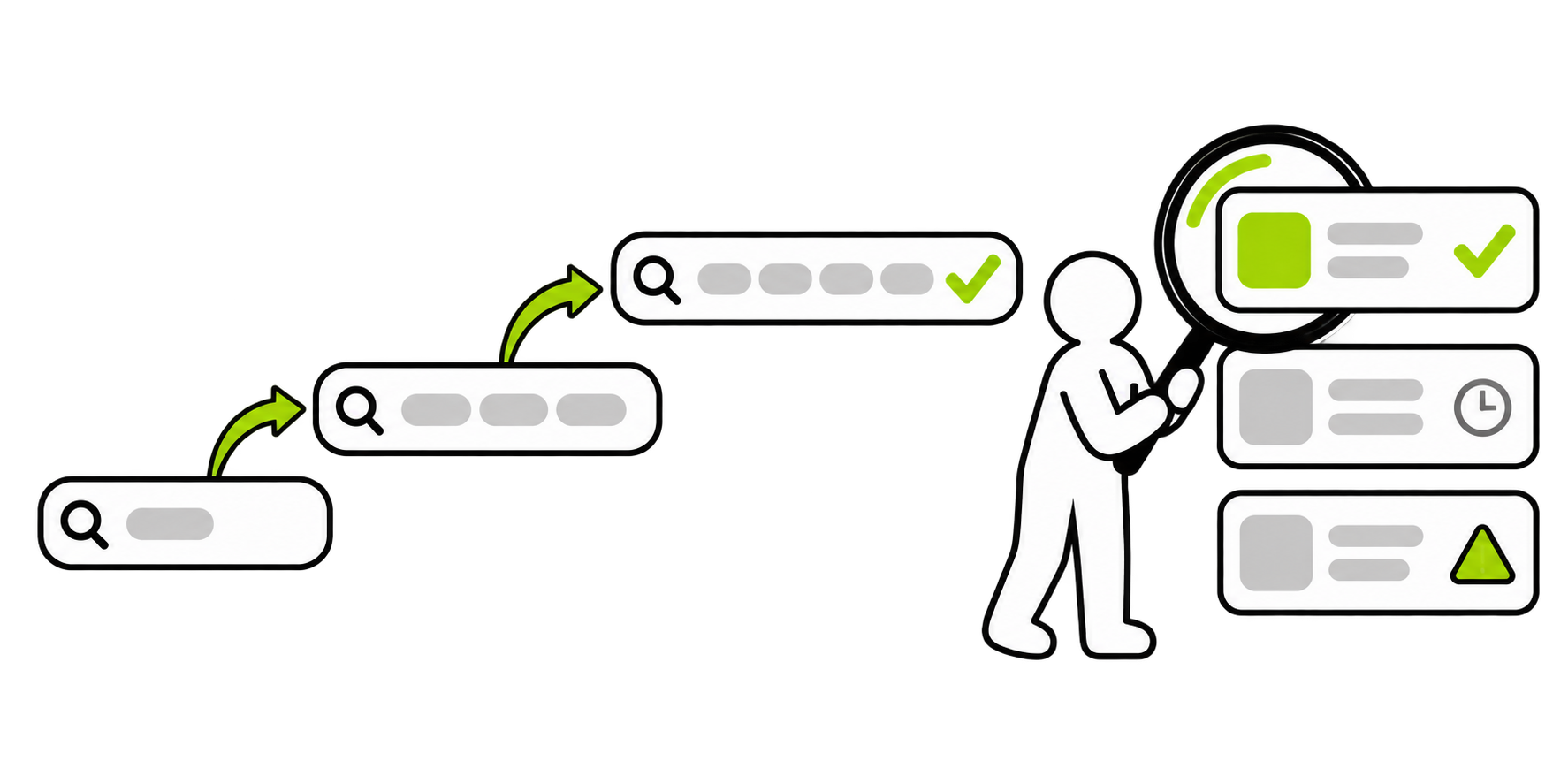
When a search does not produce helpful results, the problem may not be a lack of available information. The search engine may simply need a different description.
Words that feel natural in everyday conversation may not match the language used on helpful webpages. For example, someone might search make the picture less dark, then discover that photography guides use words such as brightness, exposure, or shadows. Those new terms can be used to improve the next search.
A search can be adjusted by:
adding the name of a device, app, product, or location
removing words that are not helping
replacing a general word with a more specific one
describing the problem instead of guessing at the solution
including an error message exactly as it appears
adding the type of result needed, such as a guide, video, definition, or local business
This back-and-forth process is normal. Experienced technology users do not always know the correct search terms immediately. Much of their skill comes from noticing what the results reveal and adjusting the request.
Searching is less like asking one perfect question and more like having a short conversation with a directory.
Results Still Need to Be Examined
Finding information and evaluating information are connected, but they are not the same skill.
A search engine can point toward a webpage. It cannot guarantee that every claim on that page is accurate, current, complete, or suitable for a particular situation. Websites are created by different people and organizations for different reasons. Some are designed to teach. Some are designed to sell. Some share personal experiences or opinions. Others may contain outdated, misleading, or poorly explained information.
Before relying on a result, it can help to consider a few basic questions:
Who created the information?
What is the page trying to provide or accomplish?
When was it published or updated?
Does another reliable source say something similar?
Is the result genuinely related to the original question?
Is the page giving information, selling something, or doing both?
Not every everyday search requires a major investigation. Looking for a muffin recipe is different from searching for medical, legal, or financial guidance. The importance of the decision should influence how carefully the information is checked.
The search engine helps locate the building. It does not guarantee everything inside that building is trustworthy.
A Simple Way to Remember It
The internet is the world outside a device. Websites are the buildings and places located throughout that world. Each website has an address, but that address is not always known.
A search is a request for help finding a place or piece of information.

The search engine acts like a directory, map, or information service. The search terms describe what is needed, and the search results provide possible destinations. From there, the person searching chooses which result to visit and decides how useful or trustworthy the information appears to be.
A search does not contain the whole internet, and it does not create every answer shown on the screen. It helps sort through a very large world and points toward places that may hold the answer.